
✨ Mini / Restore Toggle – Compact Mode Plugin for Cheat Engine ✨
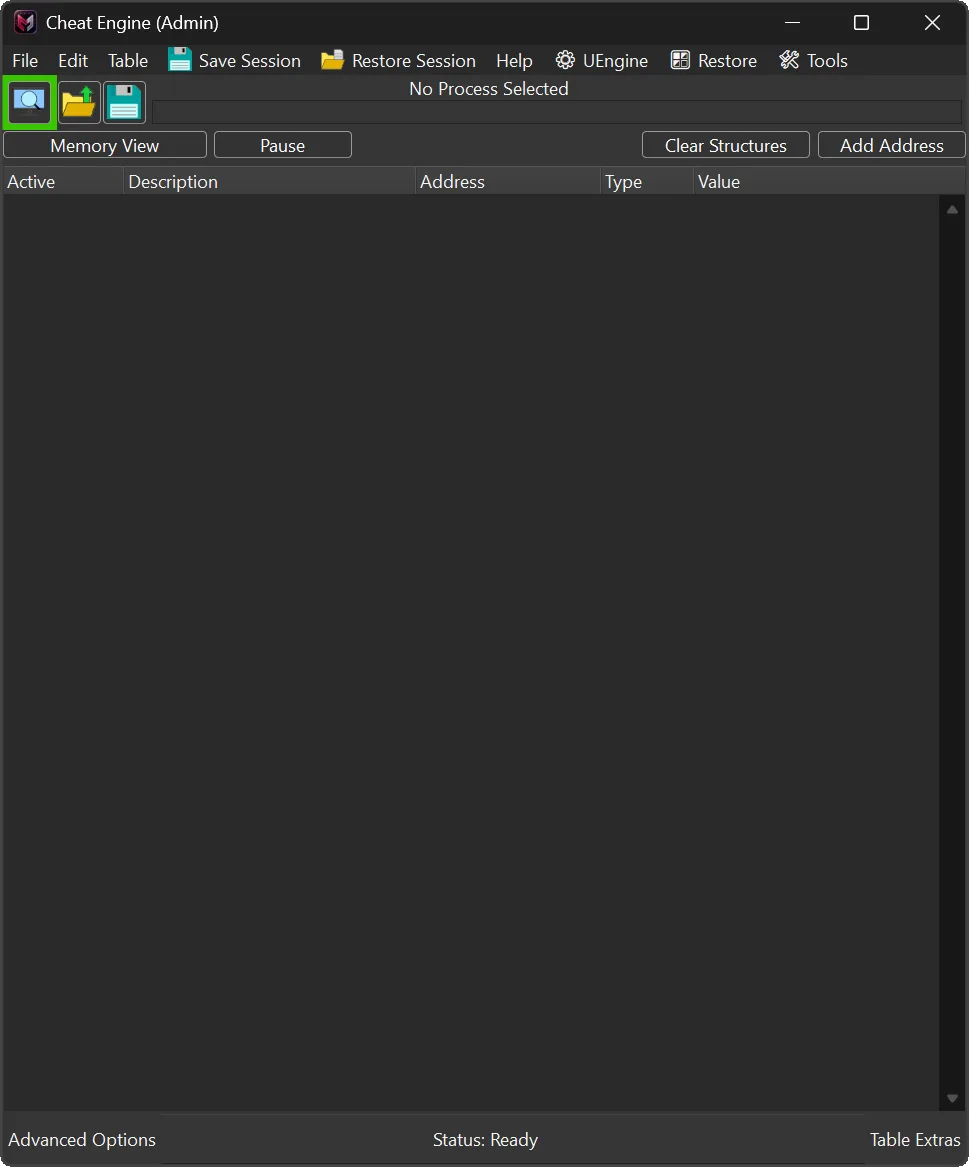
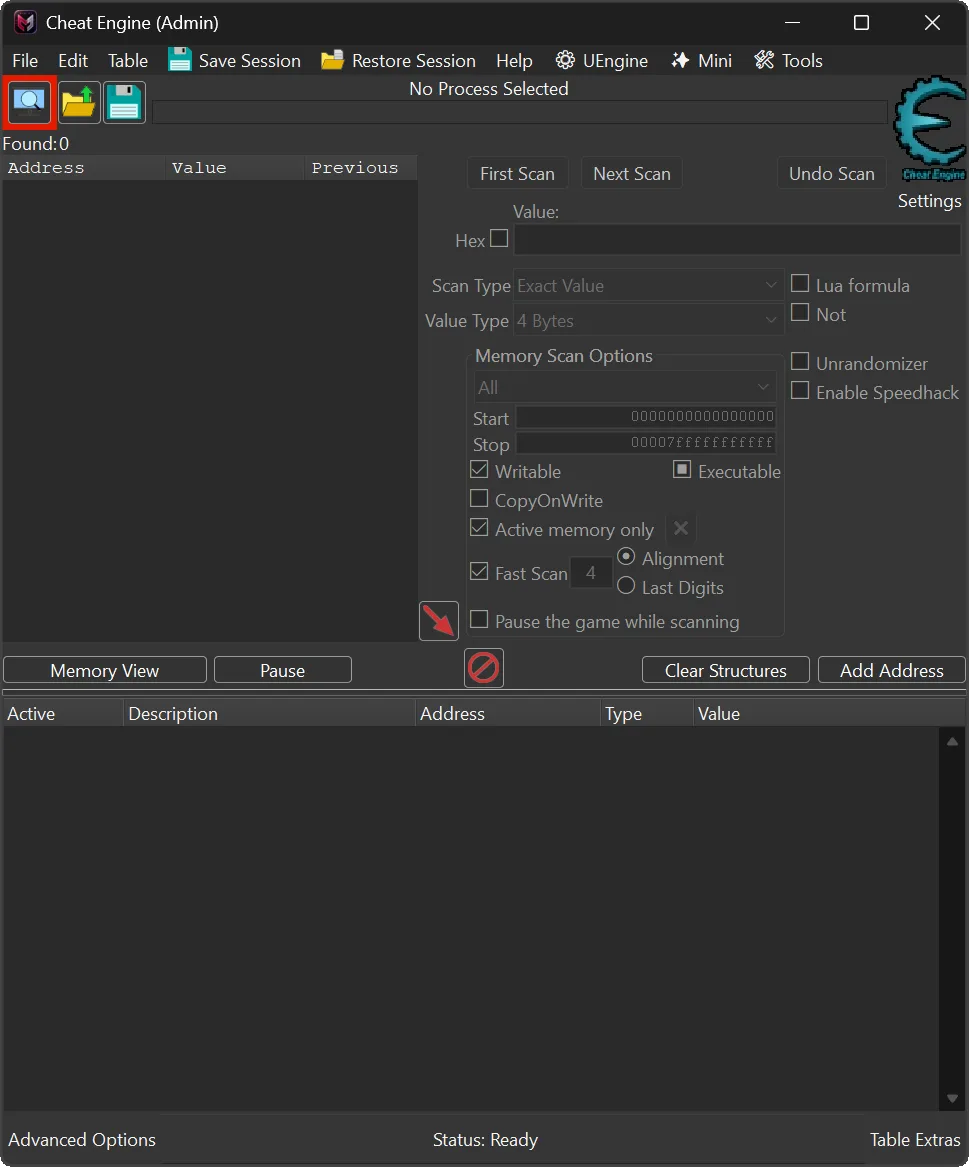
The Lightweight Cheat Engine plugin introduces a compact UI mode for the main application window, designed to optimize the workspace for advanced users. This plugin allows you to instantly hide or restore scan-related panels and extra interface components, thereby reducing visual distractions and focusing attention on memory records and active tasks.
By activating Cheat Engine Mini mode, you can toggle between a full-featured interface and a streamlined layout that prioritizes essential elements. This functionality is particularly beneficial during debugging, reverse engineering, or trainer development, where a clutter-free environment enhances concentration and efficiency. The plugin operates without permanently altering the default layout, ensuring that you can revert to the standard configuration at any time.
Designed for professionals who require a cleaner workspace, this tool supports a streamlined and efficient workflow by eliminating non-essential panels and controls. Whether you are analyzing memory structures or developing custom trainers, the compact UI mode provides a focused interface that adapts to your immediate needs, improving productivity without sacrificing access to critical features.
Update v1.1 (24/June/2026)
📐 Replaced the fixed compact-height offset with live parent-chain geometry for automatic DPI handling.
📏 Added live compact-height calculation from toolbar and bottom-button geometry, removing the empty scan area in Mini mode.
🔄 Preserved the F8/Menu Mini-Restore toggle, hidden component set, retry refresh behavior, and previous-height restore path.

🔥 Plugin Overview 🔥
- Version: 1.1
- Release Date: 24/June/2026
- Author: mul0
- Website: https://mul0.com
- Hotkey: F8
🚀 Key Features 🚀
With a single key press or menu click, the plugin hides scan-related UI elements, including:
- Scan options panel
- Scan buttons (New Scan / Next Scan / Undo Scan)
- Value type & scan type selectors
- Scan value input fields
- Logo panel and auxiliary UI blocks
- Found count label (visually minimized)
This creates a clean, minimal interface ideal for working with address lists, structures, memory viewer, or Auto Assemble scripts.
⌨️ Hotkey Support ⌨️
- F8 — Toggle Mini / Restore mode instantly
Perfect for fast workflow switching without touching the mouse.
🪟 Menu Integration 🪟
The plugin adds a dedicated menu item to Cheat Engine’s main menu:
- Caption dynamically changes:
- ✨ Mini → when full UI is visible
- 🪟 Restore → when compact mode is active
This makes the current UI state always clear.
⚙️ How to Install ⚙️
- Place the “MiMain – CompactMode.lua” file into Cheat Engine’s autorun (Cheat Engine\autorun) folder
- Restart Cheat Engine
- Use F8 or the menu item to toggle Compact Mode
That’s it — no configuration required.
ℹ️ Automatic DPI Layout ℹ️
Cheat Engine layouts can differ depending on Windows DPI scaling, theme, and toolbar geometry. In v1.1, Compact Mode uses the live control positions already reported by Cheat Engine instead of a hardcoded pixel offset.
This means Mini mode should collapse more reliably on different setups without editing the script. If the visual layout still looks unusual, reload the plugin or restart Cheat Engine after confirming that the v1.1 file is installed.
💬 Feedback & Updates 💬
Have suggestions or need help? Drop a comment below! 🚀
Attachments
| File | Date added | Added by | File size | Downloads |
|---|---|---|---|---|
 MiMain - CompactMode (v1.1).zip
|
June 24, 2026 8:22 AM | mul0 | 96 KB | 91 |
|
MiCompactMode (v1.0).zip
|
February 10, 2026 4:59 PM | mul0 | 117 KB | 201 |
Hi,
this plugin is very cool but could you add the possibility to choose the initial state (compact/full) ?
Thanks 😉