
🤖 AA Script Description Translator 🤖
AA Script Description Translator is a lightweight Lua plugin for Cheat Engine that translates and normalizes Auto Assembler script descriptions through the DeepSeek API. It turns inconsistent or multilingual Cheat Table labels into concise trainer-style names while keeping every proposal visible for review before it changes the actual records.
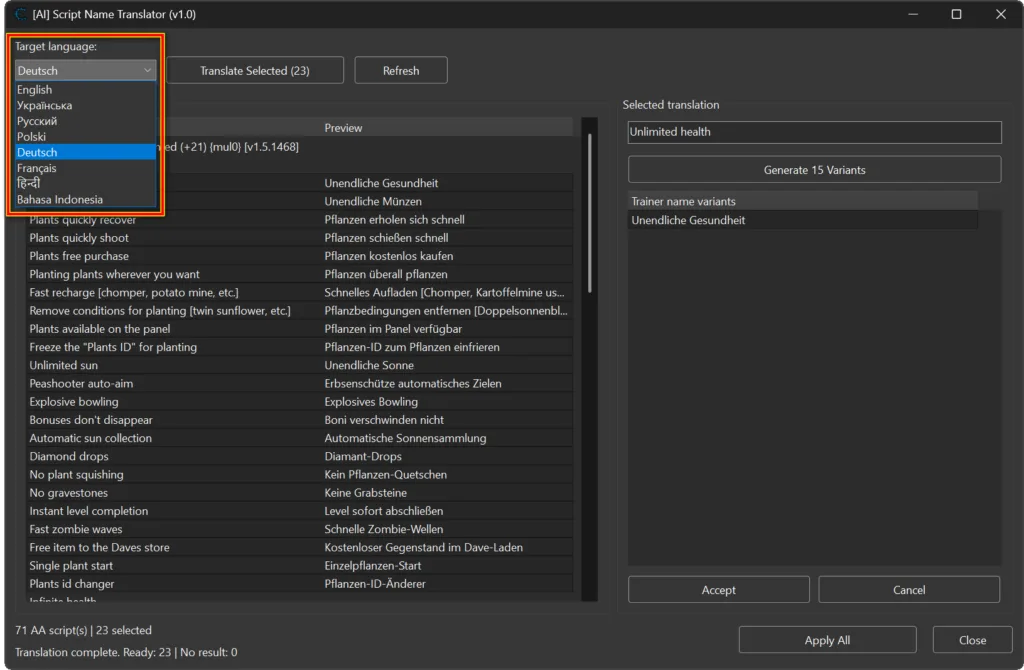
The plugin supports batch translation, eight target languages, per-script previews, and up to 15 alternative names for a focused script. It is designed for trainer authors, Cheat Table editors, localization work, and anyone who wants consistent feature names without editing every AA script description manually.
📋 Plugin Information 📋
- Name: AA Script Description Translator
- Version: 1.0
- Release date: 12/August/2026
- Author: mul0
- Required service: DeepSeek API with your personal API key
🧠 What the Plugin Does 🧠
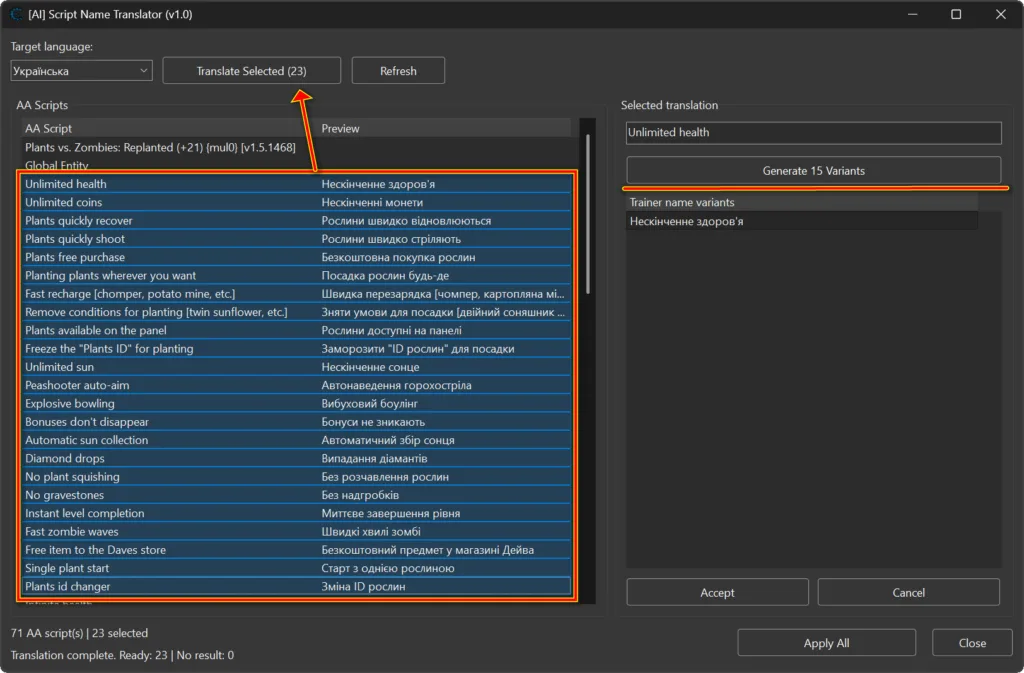
The translator collects Auto Assembler script records from the current Cheat Table and displays their existing descriptions in a dedicated manager window. Select one or more records, choose the target language, and click Translate Selected. DeepSeek returns concise trainer-style proposals that appear in the Preview column.
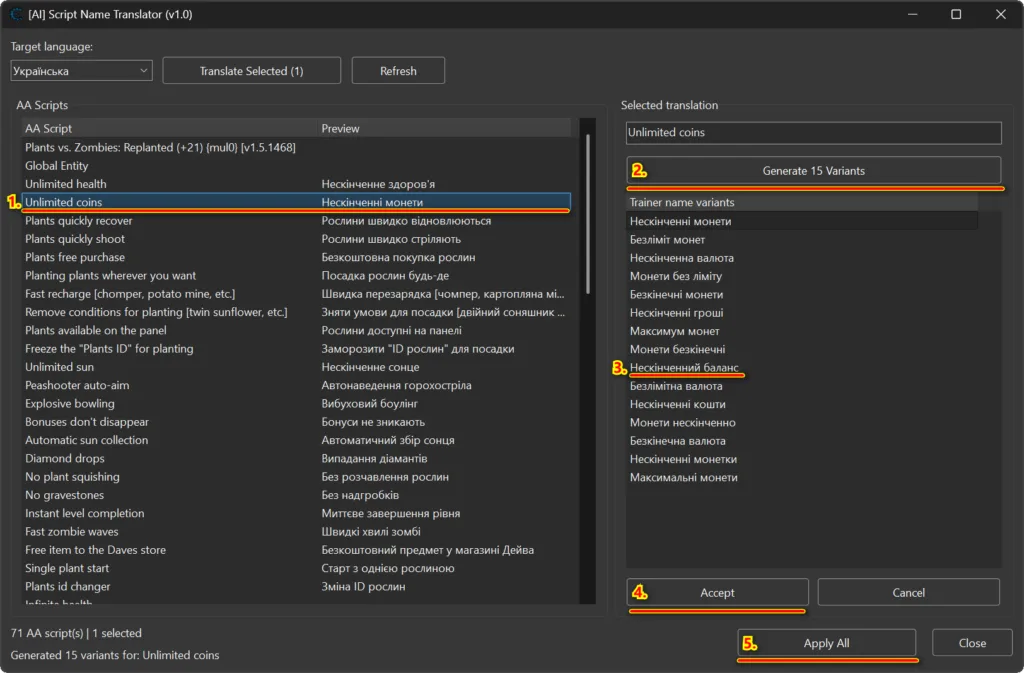
Nothing is applied immediately. You can inspect each proposal, select a specific record, generate alternatives, accept the preferred name, and use Apply All only when the reviewed results are ready.
✨ Key Features ✨
- Translate or normalize one or multiple selected AA script descriptions.
- Preview every generated name before modifying the Cheat Table.
- Generate up to 15 alternative trainer-style names for a focused script.
- Display valid partial variant responses when DeepSeek returns fewer than 15 unique names.
- Accept one preferred variant without immediately changing the real record.
- Apply all accepted proposals in one operation.
- Use Ctrl+A inside the script list to select all visible AA script rows.
- Refresh the current table with a warning before unapplied proposals are discarded.
- Run DeepSeek requests in a background worker through curl.
- Handle malformed JSON, API errors, missing results, and request failures defensively.
- Reuse the translator window and provide a DPI-aware, resizable layout.
🌍 Supported Languages 🌍
AA Script Description Translator v1.0 supports the following target languages:
- English
- Ukrainian
- Russian
- Polish
- German
- French
- Hindi
- Indonesian
If a source description is already in the selected language, the prompt instructs DeepSeek to normalize and improve it rather than perform a literal translation.
✅ Review, Accept, and Apply ✅
- Select one or more AA scripts.
- Choose the target language.
- Click Translate Selected and review the Preview column.
- Focus a record to inspect its selected translation.
- Optionally generate alternative trainer names.
- Select a variant and click Accept.
- Click Apply All to write all accepted proposals to their MemoryRecord descriptions.
🔑 DeepSeek API Key Requirement 🔑
The public Lua file does not include an API key. Create or obtain your own key from the DeepSeek Platform, open the plugin in a text editor, and replace PASTE_YOUR_DEEPSEEK_API_KEY_HERE with your personal key.
Keep the key private. DeepSeek availability, pricing, usage limits, and terms are controlled by DeepSeek and may change independently of this plugin.
⚙️ Installation ⚙️
- Download MiMain – AA Script Description Translator (v1.0).lua.
- Open the Lua file and replace PASTE_YOUR_DEEPSEEK_API_KEY_HERE with your personal DeepSeek API key.
- Copy the file into Cheat Engine\autorun\.
- Start or restart Cheat Engine.
- Open a Cheat Table containing Auto Assembler script records.
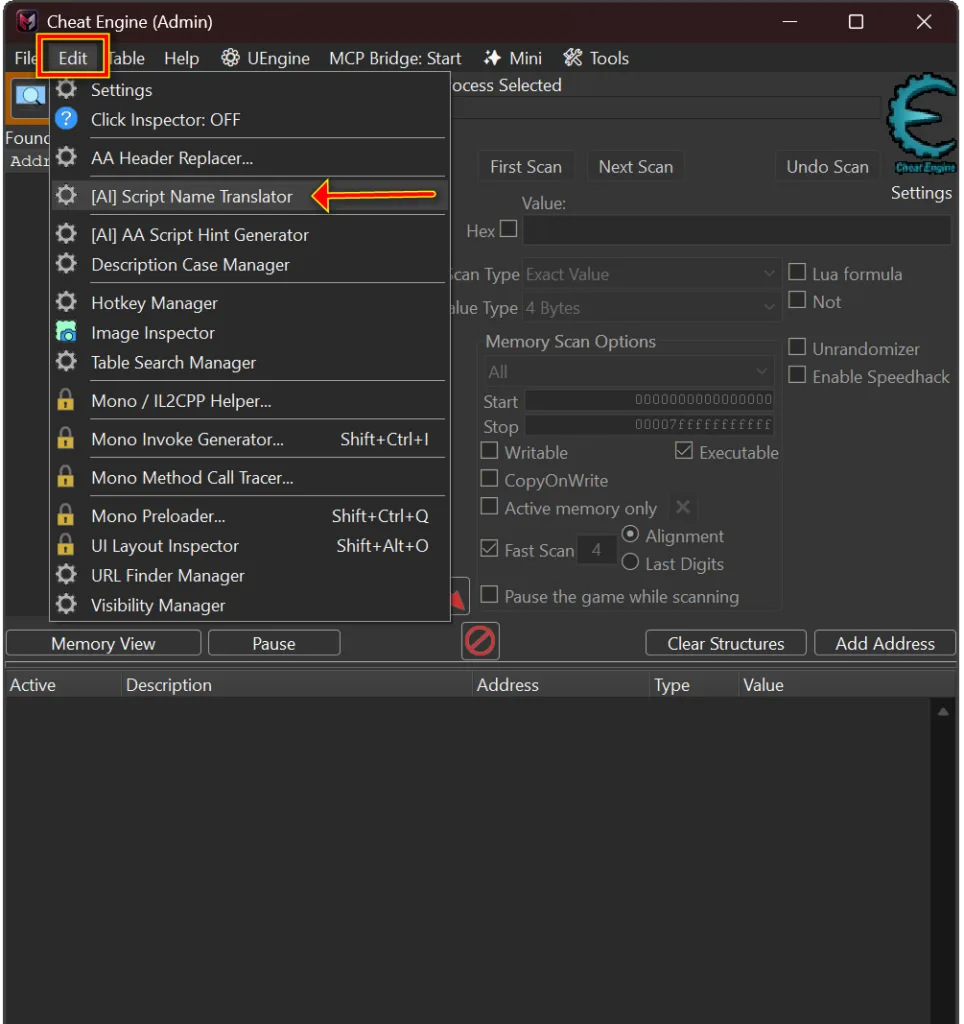
- Open Cheat Engine’s Edit menu and choose [AI] Script Name Translator.
⚠️ Important Notes ⚠️
- Review generated names before applying them. AI output can be inaccurate or unsuitable for a specific game.
- Keep game-specific names, abbreviations, item names, and technical terms intact when the generated translation should not localize them.
- Refreshing the script list may discard unapplied proposals after confirmation.
- The plugin requires internet access, curl.exe, and a working DeepSeek API key.
- Do not publish a personal API key inside the downloadable Lua file.
- Runtime behavior depends on the installed Cheat Engine version and the external DeepSeek service.
💬 Feedback & Support 💬
Have a translation workflow idea, language request, or bug report? Leave a comment below.

Attachments
| File | Date added | Added by | File size | Downloads |
|---|---|---|---|---|
 MiMain - AA Script Description Translator (v1.0).zip
|
August 12, 2026 8:26 PM | mul0 | 313 KB | 9 |