
🔍 Hotkey Manager – Plugin for Cheat Engine 🔍
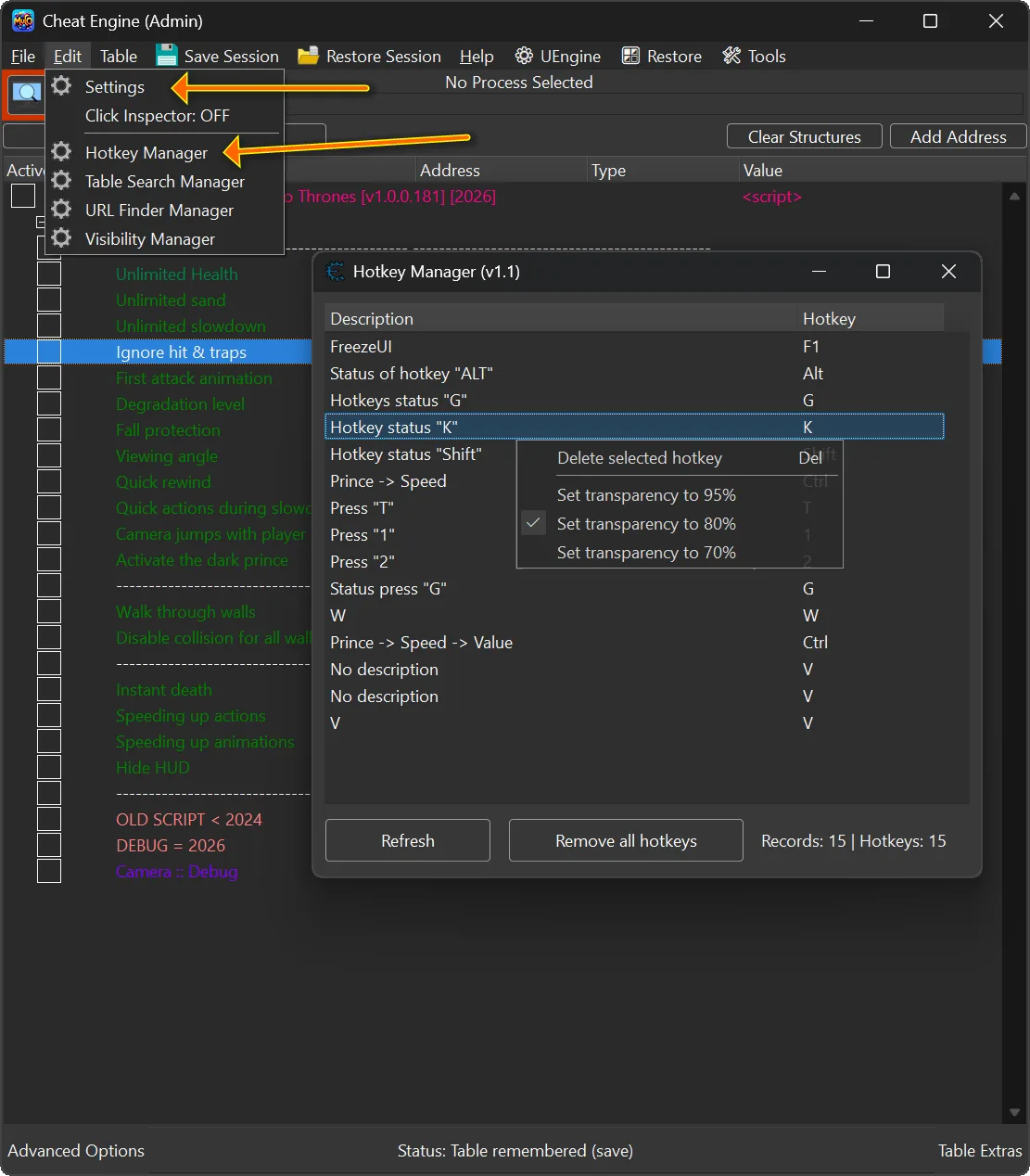
Lightweight plugin for Cheat Engine that provides full visibility and control over all hotkeys assigned to memory records.
When working with large tables or during long debugging sessions, Cheat Engine trainer hotkeys can quickly become difficult to track and manage. This plugin solves that problem by offering a centralized, DPI-friendly manager where you can easily view, inspect, and remove hotkeys in a clean and efficient interface.
With this tool, managing hotkeys becomes faster and more organized, improving both usability and workflow when creating trainers.
Update v1.1 (16/April/2026)
🆕 Added transparency options in the context menu.
🪟 Added window resizing support (list and status label now adjust dynamically).
🛠 Improved error handling when removing hotkeys.
🎨 UI tweaks and general code optimizations.
⚙️ Better handling of edge cases (e.g., records without descriptions, hotkeys without assigned text).
🖥 Improved DPI scaling support (UI now looks better on high-DPI displays).

📌 Plugin Information 📌
- Version: 1.1
- Author: mul0
- Website: https://mul0.com
- Platform: Cheat Engine (Lua autorun plugin)
🔥 Key Features 🔥
- Scans the entire Address List and collects all assigned hotkeys
- Displays:
- Memory record description
- Assigned key combination (human-readable format)
- Shows live statistics:
- Total records with hotkeys
- Total number of hotkeys
⌨️ Hotkey Management ⌨️
- Delete a selected hotkey
- Via context menu
- Or simply press Delete
- Remove all hotkeys at once with a single click
- Perfect for cleanup before releasing a table or trainer
🖥️ DPI-Friendly & Stable UI 🖥️
- Uses Cheat Engine’s main form font for proper DPI scaling
- Fixed window size for consistent layout
- Keyboard-friendly navigation
- Safe reference handling to avoid memory leaks or crashes
🧠 Smart Internal Design 🧠
- Uses CE Lua references (createRef / getRef / destroyRef) to safely track hotkey objects
- Fallback logic ensures hotkeys can still be removed even if references change
- Reverse-order destruction prevents index corruption
📂 Seamless Integration 📂
- Automatically adds Hotkey Manager to the Edit menu
- No duplicate menu entries
- One click to open — no configuration required
⚙️ How to Install ⚙️
1️⃣ Copy “MiMain – HotkeysManager.lua” into Cheat Engine’s autorun folder (Cheat Engine\autorun)
2️⃣ Restart Cheat Engine
3️⃣ Open Edit → Hotkey Manager
That’s it — the plugin is ready to use. ✅
💬 Feedback & Support 💬
Have suggestions or need help? Drop a comment below! 🙌
Attachments
| File | Date added | Added by | File size | Downloads |
|---|---|---|---|---|
 MiMain - HotkeysManager (v1.1).zip
|
April 16, 2026 9:10 AM | mul0 | 152 KB | 112 |
|
MiMain - HotkeysManager (v1.0).zip
|
February 10, 2026 10:54 PM | mul0 | 141 KB | 271 |