
⚡ Quick Jump Patch — Cheat Engine Plugin ⚡
This plugin is a lightweight yet powerful extension for Cheat Engine, designed to significantly enhance the efficiency of reverse engineering, debugging, and game hacking workflows. Its core functionality allows you to instantly patch assembly instructions directly from the Memory Viewer with a single hotkey press, eliminating the need for manual opcode editing or the creation of Auto Assembler scripts.
By providing a faster, more intuitive method for controlling program execution, the tool streamlines the process of modifying execution flow. The plugin can toggle NOP, invert conditional jumps, force JMP instructions, return immediately with RET, or force an AL return value with mov al,01; ret and mov al,00; ret, all without leaving the disassembler.
All modifications are fully reversible and safely tracked within the plugin’s system. Because of this robust tracking, you can restore original instructions at any time, ensuring that you maintain full control over memory modifications while avoiding unwanted errors or instability. The plugin automatically handles instruction size and byte replacement, guaranteeing that patches remain stable and reliable across a wide range of scenarios.
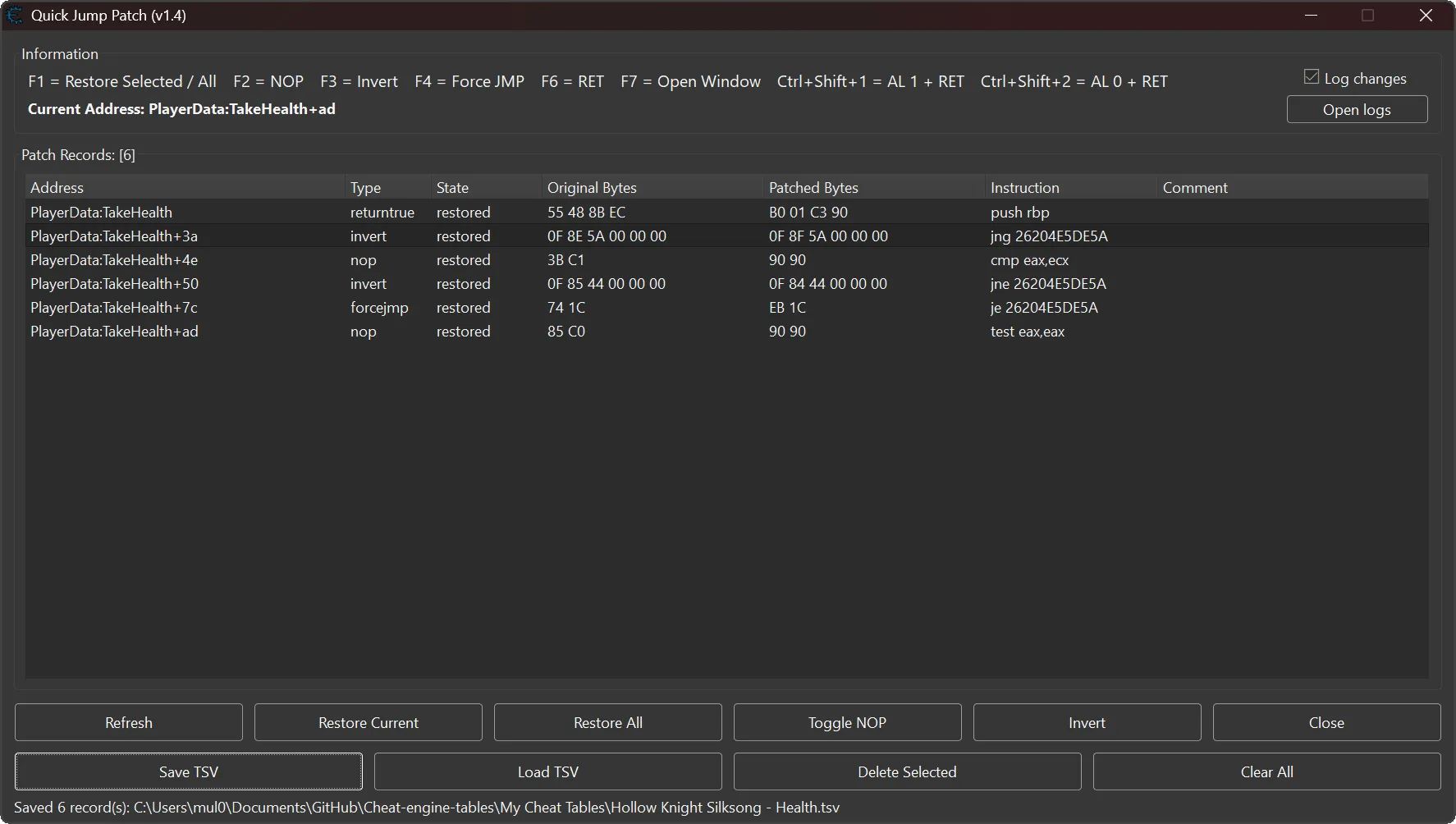
For comprehensive management, the built-in Patch Manager provides a clear, organized overview of all tracked patches. It supports multi-selection, batch actions, comments, TSV save/load, readable symbol-plus-offset addresses, and optional per-process Jump Logs.
Update v1.4 (12/August/2026)
↩️ Added Ctrl + Shift + 1 to toggle mov al,01; ret and Ctrl + Shift + 2 to toggle mov al,00; ret.
♻️ Added complete restoration of every original byte covered by a return-value patch.
📝 Added optional per-process Jump Logs for successful patch and restore actions.
☑️ Added Log changes and Open logs controls to Patch Manager.
🏷️ Added Cheat Engine symbol-plus-offset address display while preserving numeric addresses for patch operations.
💾 Added a display-address column to TSV exports while keeping TSV loading compatible with the previous v1.3 layout.
🔀 Improved short and near conditional-jump inversion by changing Jcc opcode bytes in place and preserving instruction length.
🛡️ Hardened Memory Viewer menu access to prevent recursive callback failures.
🖥️ Refined Patch Manager height, status feedback, hotkey captions, logging-control layout, and keyboard focus behavior.
Update v1.3 (24/June/2026)
🧩 Added model-backed patch records for more reliable Patch Manager state tracking.
☑️ Added multi-select support in the Patch Manager.
⌨️ Added batch hotkeys for selected records in the Patch Manager: F1, F2, F3, F4, and F6.
↩️ Added F1 restore behavior in the Patch Manager: restore selected records, or restore all active patches when nothing is selected.
💾 Added Save TSV for exporting patch records to a TSV file.
📂 Added Load TSV for importing saved patch records back into the manager.
📋 Added TSV support for saving comments, original bytes, patched bytes, patch type, and module-relative addresses.
💬 Added comments for patch records.
✏️ Added comment editing with Alt + double-click.
🗑️ Added Delete Selected for removing selected patch records.
🧹 Added Clear All for clearing the full patch record list.
🖱️ Added a right-click context menu for patch record actions.
🏷️ Added automatic default TSV filenames based on the attached process name without the .exe extension.
🛡️ Improved safety when memory bytes were changed outside the plugin.
⚠️ Improved write-failure handling when applying or restoring patches.
🔄 Improved patch switching behavior for existing records.
🎯 Improved selection and focus restoration after editing comments.
🏗️ Improved overall Patch Manager record handling by using a dedicated data model instead of relying only on the UI table.
Update v1.2 (09/June/2026)
🛡️ Added a modifier-key guard for the main plugin hotkeys.
🚫 Prevented Ctrl + F-key combinations from triggering Quick Jump Patch actions.
⛔ Prevented Alt + F-key combinations from triggering Quick Jump Patch actions.
🔒 Prevented Shift + F-key combinations from triggering Quick Jump Patch actions.
🪟 Prevented Win + F-key combinations from triggering Quick Jump Patch actions.
⌨️ Improved hotkey safety so only plain single-key hotkeys like F2, F3, F4, F6, and F7 activate plugin actions.
🎯 Reduced accidental patching when using Cheat Engine, Windows, or other application shortcuts that include modifier keys.
Update v1.1 (16/April/2026)
🔧 Added F6 key for toggling RET patch and updated UI captions to reflect the new hotkey.
⚙️ Reassigned F6 from opening “Patch Manager” to toggling “RET patch”, and reassigned “F7 to open Patch Manager” for better hotkey organization.
📌 Plugin Information 📌
- Version: 1.4
- Author: mul0
- Website: https://mul0.com/
- Hotkeys: F1, F2, F3, F4, F6, F7, Ctrl + Shift + 1, and Ctrl + Shift + 2
- DPI Support: DPI-aware interface with runtime scaling
⚙️ Key Features ⚙️
- ✅ One-click patching directly in Memory Viewer
- ✅ Toggle NOP on any instruction
- ✅ Invert conditional jumps (JE ↔ JNE, JG ↔ JLE, etc.)
- ✅ Force execution flow with unconditional JMP
- ✅ Toggle RET on the current instruction
- ✅ Toggle mov al,01; ret or mov al,00; ret return-value patches
- ✅ Safely collect complete instructions for short return-value patch locations
- ✅ Fill remaining return-value patch bytes with 90 NOPs
- ✅ Instant restore of original instructions
- ✅ Patch Manager with full patch list and navigation
- ✅ Multi-select batch actions, comments, and TSV save/load
- ✅ Optional per-process Jump Logs with Log changes and Open logs controls
- ✅ Readable Cheat Engine symbol-plus-offset addresses when available
- ✅ Automatic instruction analysis and size handling
- ✅ Safe patch tracking with original byte backup
- ✅ Works seamlessly with disassembler and hex view
- ✅ Lightweight and performance-friendly
🧠 What the Plugin Does 🧠
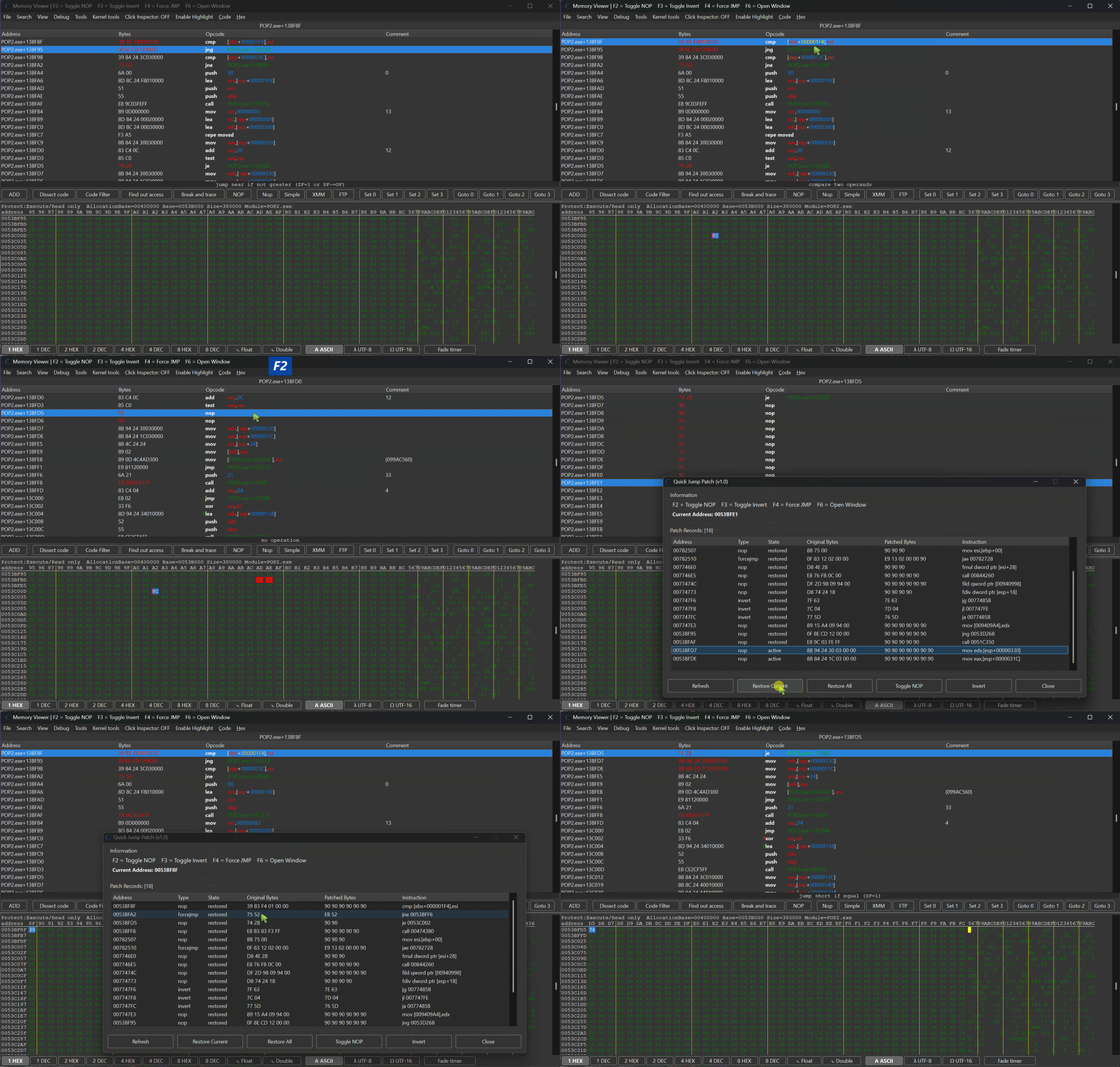
Quick Jump Patch allows you to modify execution flow in real time by patching instructions directly in memory.
For example, instead of manually changing:
jng 0053D268
You can instantly convert it into:
jg 0053D268
Or even force execution with:
jmp 0053D268
All operations are performed instantly using hotkeys, without interrupting your workflow.
🧩 Supported Modes 🧩
🔹 NOP Toggle
- Replaces the current instruction with NOPs
- Press again to restore original bytes
🔹 Invert Conditional Jump
- Automatically flips jump conditions (JE ↔ JNE, JA ↔ JBE, etc.)
- Perfect for bypassing checks and conditions
- Press again to restore original bytes
🔹 Force JMP
- Converts any conditional jump into unconditional JMP
- Forces execution to always follow the jump path
- Press again to restore original bytes
🔹RET Toggle
- Replaces the current instruction with RET
- Press again to restore original bytes
🔹 Return-Value Toggle
- Ctrl + Shift + 1 applies mov al,01; ret
- Ctrl + Shift + 2 applies mov al,00; ret
- If the selected instruction is shorter than three bytes, the plugin includes the next complete instruction or instructions until enough space is available
- The plugin does not intentionally split an instruction; every remaining byte after RET is replaced with
90NOP - Press the same hotkey again to restore the complete original byte range
📊 Patch Manager 📊
Built-in manager window allows you to:
- View all patched instructions
- See patch type, state, original bytes, patched bytes, instruction text, and comments
- Use Cheat Engine symbol-plus-offset addresses when available and navigate to selected records
- Select multiple records and apply NOP, Invert, Force JMP, or RET in a batch
- Press F1 to restore selected records, or restore all active patches when nothing is selected
- Add comments with Alt + double-click
- Save and load patch records through backward-compatible TSV files
- Delete selected records or clear the complete list
- Enable optional per-process Jump Logs and open the log folder
This ensures full visibility and control over all applied modifications.
🚀 Usage 🚀
- Open Memory Viewer
- Select an instruction in Disassembler
- Use hotkeys:
- F2 — NOP toggle
- F3 — Invert jump
- F4 — Force JMP
- F6 — Toggle RET
- Ctrl + Shift + 1 — Toggle mov al,01; ret
- Ctrl + Shift + 2 — Toggle mov al,00; ret
- Press F7 to open Patch Manager
- Inside Patch Manager, press F1 to restore selected records or all active patches when no record is selected
🖥️ UI & DPI Scaling 🖥️
The plugin automatically adapts to different DPI settings:
- 100%
- 125%
- 150%
- 175%
Ensuring consistent layout and usability across all displays.
💡 Use Cases 💡
- Bypassing in-game checks
- Forcing conditions to always pass/fail
- Skipping validation logic
- Testing alternative execution paths
- Reverse engineering control flow
📌 Compatibility 📌
- Cheat Engine 6.4 or newer
- Supports x86 and x64 processes
- Works inside Memory Viewer
⚙️ Installation ⚙️
- Place “MiMemory Viewer – Quick Jump Patch (v1.4).lua” into Cheat Engine’s autorun folder: Cheat Engine\autorun\
- Restart Cheat Engine.
- Open Memory Viewer and use hotkeys to start patching
💬 Feedback & Support 💬
Have suggestions or need help? Drop a comment below! 🙌

Attachments
| File | Date added | Added by | File size | Downloads |
|---|---|---|---|---|
 MiMemory Viewer - Quick Jump Patch (v1.4).zip
|
August 12, 2026 9:24 PM | mul0 | 548 KB | 38 |
|
MiMemory Viewer - Quick Jump Patch (v1.3).zip
|
June 24, 2026 7:53 AM | mul0 | 197 KB | 103 |
|
MiMemory Viewer - Quick Jump Patch (v1.2).zip
|
June 9, 2026 8:18 PM | mul0 | 241 KB | 81 |
|
MiMemory Viewer - Quick Jump Patch (v1.1).zip
|
April 16, 2026 8:35 AM | mul0 | 282 KB | 110 |
|
MiMemory Viewer - Quick Jump Patch (v1.0).zip
|
April 5, 2026 3:18 PM | mul0 | 304 KB | 76 |
Great plugin! Very high quality work, thank you very much.
I have two suggestions.
1. If it’s not difficult, please add the ability to clear the list of addresses. As you work with the plugin, addresses accumulate in the list. It would be desirable to be able to delete both individual addresses from the list and clear the entire list of addresses at once, while restoring the original bytes.
2. If possible, please add another column to the addresses field (after the “Instruction” column), where you could manually enter a short comment for each address. When working with a plugin, when there are many addresses in the list, you have to remember which address means what. Therefore, it would be convenient if you could add a reminder comment to each address (for example, “Ammo”, “Exp”, “Health”).
Hi, thank you for your feedback. Yes, this is completely doable, and I think I will add everything you requested in the next 1.3 update. 😇😎
(можно я по-русски, ладно?)
Замечательное обновление, спасибо большое, что откликнулись на мою просьбу! Теперь инструмент стал ещё лучше, постоянно его использую.
—–
Ребята, всем, кто занимается читерством, очень рекомендую этот плагин и другие плагины автора с этого сайта. Видно, что автор глубоко владеет темой. Удобные, качественно выполненные, полезнейшие в читерстве инструменты, они порой реально незаменимые, без преувеличения. Кто хоть раз пробовал вручную править в дизассемблере чит-енжин десяток-другой прыжков, потом возвращать обратно и потом снова править, тот знает, насколько муторное это занятие, и сразу оценит удобство и продуманность предлагаемого инструмента.
Спасибо за отзыв! Другие плагины тоже в разработке, сейчас занимаюсь их полировкой. А для этого плагина уже готовиться обновление, думаю, в следующем году… точнее, в следующем месяце будет готово! 😉
Hello my family member! I wish to say that this post is amazing, great written and include approximately all important infos.
I’d like to see more posts like this .
Thank you so much for the kind words! I’m really glad you found the post helpful and informative. I’ll definitely keep working on similar content! 😇😎