
⚡ Accessed Opcodes – NOP Toggle ⚡
Accessed Opcodes – NOP Toggle is a lightweight Lua plugin for Cheat Engine that adds fast and reversible NOP patching directly to the found-code windows used by “Find out what accesses this address” and “Find out what writes to this address.”
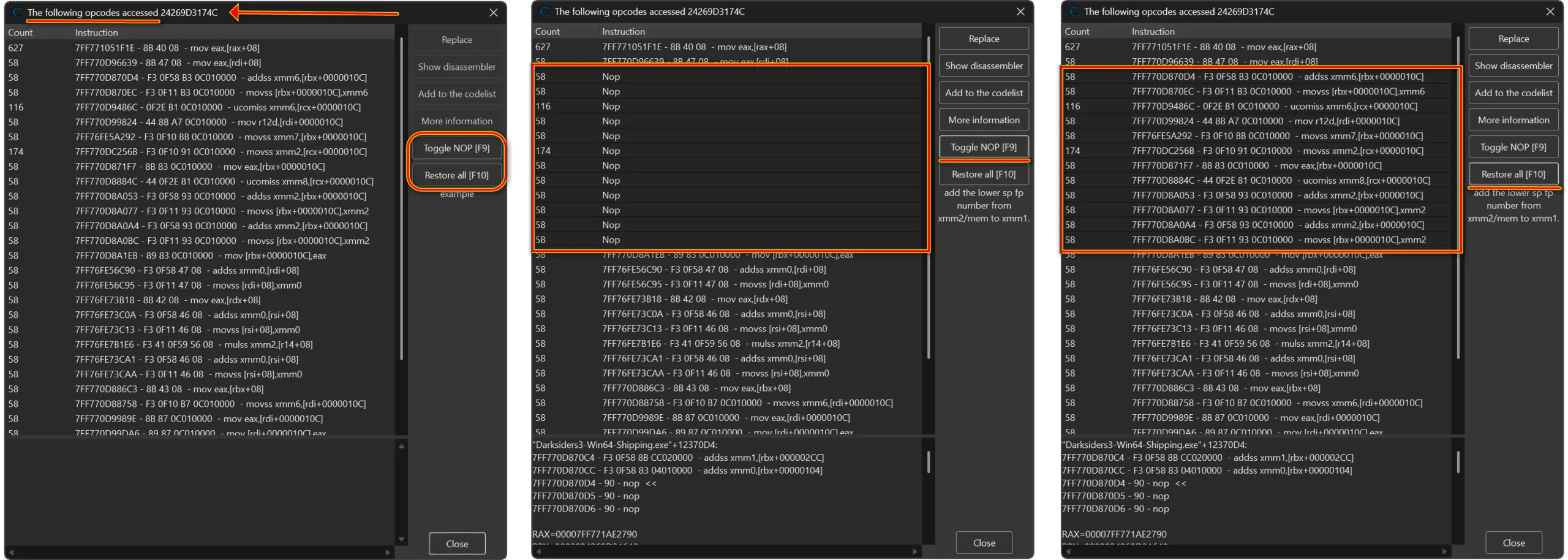
Instead of opening the Memory Viewer, manually calculating instruction sizes, and editing bytes one instruction at a time, you can select one or multiple opcode rows and press F9 or click Toggle NOP. The plugin automatically detects the full instruction size, stores the original bytes, writes the required 90 NOP bytes, and updates the selected row so the active patch is easy to identify.
Press F9 again on a patched row to restore that instruction, or press F10 to restore every patch created by the plugin during the current Cheat Engine session. Memory writes are verified before the plugin changes its internal patch state or updates the visible opcode row.
📌 Plugin Information 📌
- Name: MiAccessed Opcodes – NOP Toggle
- Version: 1.0
- Author: mul0
- Website: https://mul0.com/
- Hotkeys: F9 — Toggle NOP / Restore selected; F10 — Restore all
⚡ What the Plugin Does ⚡
The plugin automatically detects Cheat Engine’s supported found-code opcode dialogs and adds two native-style action buttons to their side panel:
- Toggle NOP [F9] — applies or restores a NOP patch for every selected instruction row.
- Restore all [F10] — restores all instruction patches tracked by the plugin in the current session.
It works with both “The following opcodes accessed…” and “The following opcodes write to…” windows. The plugin supports multi-selected rows, preserves the original instruction bytes and row display text, and keeps the buttons aligned with Cheat Engine’s native side-panel controls.
🚀 Key Features 🚀
✨ F9 Toggle NOP
Select one or more opcode rows and press F9. The plugin reads the complete instruction, determines its byte length, stores the original bytes, and replaces the instruction with the correct number of NOP bytes.
↩️ Restore Selected Instructions
Select a row already patched by the plugin and press F9 again. If the current bytes still match the stored NOP patch, the original instruction bytes and visible row text are restored.
🧹 F10 Restore All
Press F10 or click Restore all to restore every active patch created by this plugin during the current Cheat Engine session. This is useful when several instructions were tested across one or more found-code windows.
☑️ Multi-Selection Support
The Toggle NOP action can process multiple selected instruction rows in one operation, making it faster to test groups of related opcodes without manually patching each instruction.
🛡️ Verified Patch and Restore Writes
After every memory write, the plugin reads the bytes back and confirms that the requested data was written correctly. Before restoring an instruction, it also verifies that the current bytes still match the NOP patch recorded by the plugin. If another script or tool changed those bytes, the plugin refuses to overwrite them with stale data.
🪟 Accessed and Write-To Window Support
The plugin recognizes both accessed-opcodes and write-to-opcodes dialogs, including existing windows and compatible windows opened after the plugin has loaded.
🎨 Native-Style DPI-Aware Buttons
The two action buttons copy the style and dimensions of Cheat Engine’s native controls, use DPI-aware spacing, and automatically realign when the found-code window is resized.
⌨️ Hotkeys and Actions ⌨️
- F9 — Toggle NOP for all selected opcode rows. Press it again on a tracked patched row to restore the original instruction.
- F10 — Restore all instruction patches tracked by the plugin in the current Cheat Engine session.
- Toggle NOP [F9] button — performs the same selected-row action without using the keyboard.
- Restore all [F10] button — restores all tracked session patches.
📒 Example Workflow 📒
- Attach Cheat Engine to the target process.
- Find the memory address you want to investigate.
- Use Find out what accesses this address or Find out what writes to this address.
- Trigger the relevant action in the target application so Cheat Engine collects opcode rows.
- Select one or multiple instructions in the found-code window.
- Press F9 or click Toggle NOP to apply the patches.
- Test the target application and observe the changed behavior.
- Press F9 on selected patched rows to restore them, or press F10 to restore all tracked patches.
💻 Compatibility 💻
- Cheat Engine with Lua autorun support.
- Works with Cheat Engine found-code opcode dialogs.
- Supports both accessed-opcodes and write-to-opcodes workflows.
- Uses Cheat Engine’s disassembler and memory read/write APIs to detect and patch complete instructions.
⚙️ Installation ⚙️
- Download MiAccessed Opcodes – NOP Toggle.lua.
- Copy the Lua file into the Cheat Engine autorun folder: Cheat Engine\autorun\
- Start or restart Cheat Engine.
- Attach Cheat Engine to a target process.
- Open an accessed-opcodes or write-to-opcodes found-code window. The Toggle NOP [F9] and Restore all [F10] buttons are added automatically.
⚠️ Important Notes ⚠️
- NOP patching modifies executable memory in the attached target process. Use it only when you understand the selected instruction’s role.
- Use F10 Restore all before restarting Cheat Engine, reloading the plugin, detaching from a still-running target, or closing Cheat Engine. Patch records are stored only for the current plugin session.
- If the instruction bytes were changed by another script or tool after the NOP patch was applied, the plugin refuses to restore potentially stale original bytes.
- The F9 and F10 polling fallback acts only when a supported found-code window is focused.
- Always keep a way to restart the target process if an experimental instruction patch causes unexpected behavior.
💬 Feedback & Support 💬
Have suggestions, bug reports, or workflow ideas? Leave a comment below.

Attachments
| File | Date added | Added by | File size | Downloads |
|---|---|---|---|---|
 MiAccessed Opcodes - NOP Toggle (v1.0).zip
|
August 12, 2026 5:40 PM | mul0 | 310 KB | 12 |