
🔎 Accessed Snapshot Viewer 🔎
Accessed Snapshot Viewer is a Cheat Engine Lua autorun plugin that adds a collapsible Registers and FPU snapshot panel to Cheat Engine’s Accessed addresses by … window.
When an instruction has accessed several addresses, the captured register context is useful for understanding the selected row. Accessed Snapshot Viewer keeps that context beside the accessed-address list: select a row, open the viewer, and inspect its available register and floating-point snapshot. It also provides focused tools for copying values, navigating to an address, resolving a base address, and opening an IPT log when Cheat Engine exposes one.
📋 Plugin Information 📋
- Name: Accessed Snapshot Viewer
- Version: 1.0
- Release date: 13/August/2026
- Author: mul0
- Platform: Cheat Engine Lua autorun plugin
🔍 What the Plugin Does 🔍
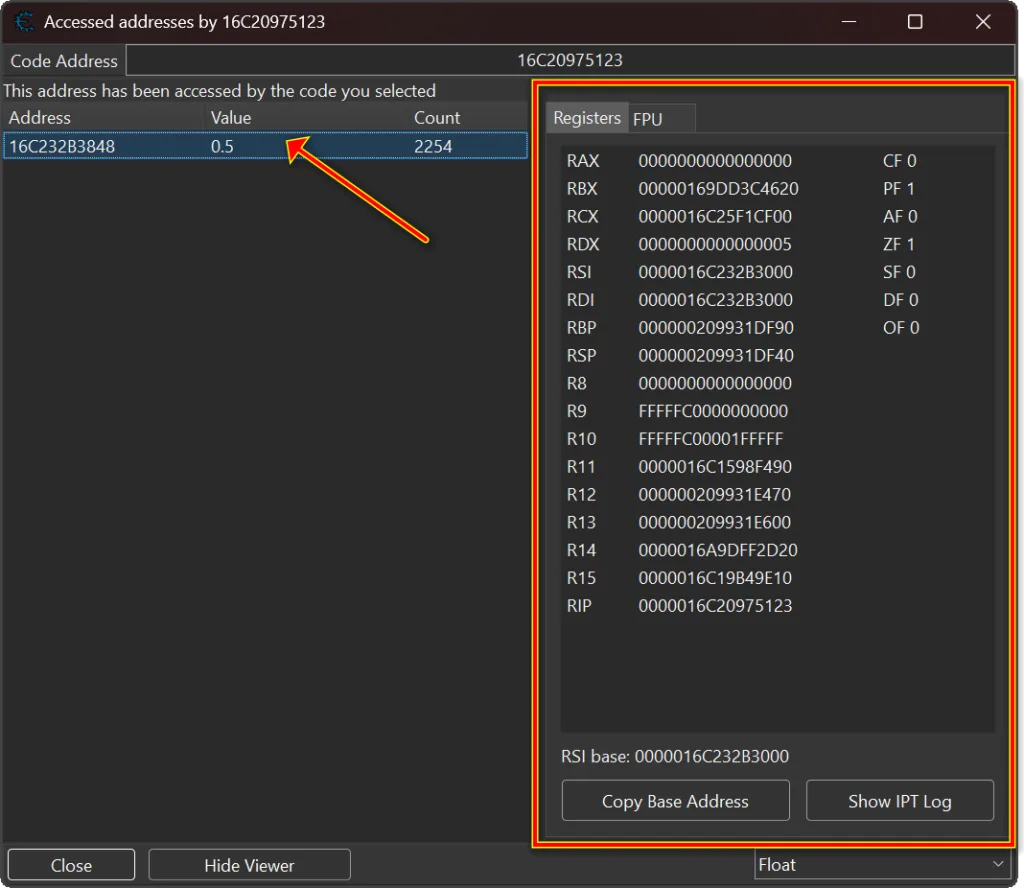
The plugin adds a Viewer button and a Show Snapshot Viewer action to the accessed-address list. The expanded panel contains Registers and FPU tabs. It refreshes as you choose another row, and it validates the direct snapshot against the selected code address before showing it.
Direct inline reading depends on the snapshot context exposed by your installed Cheat Engine build. If that path is unavailable, the plugin can use Cheat Engine’s native Registers and FPU snapshot views when those controls are present. The plugin inspects existing snapshot information; it does not patch the target process or edit the accessed-address row.
▶️ Open the Snapshot Viewer ▶️
First use Cheat Engine’s Find out what addresses this instruction accesses workflow. In the resulting Accessed addresses by … window, select one row and click Viewer. You can also right-click the row list and choose Show Snapshot Viewer. The same controls collapse the panel again when you want the full list width back.
🧠 Inspect Registers and Actions 🧠
The Registers tab lists general-purpose register values, the instruction pointer, and status flags for the selected row’s available snapshot. Double-click a register value to browse that address in Cheat Engine’s Memory Viewer. Right-click it to copy the selected value, copy all listed values, browse its memory region, or open that address in the disassembler.
Copy Base Address resolves the base register used by the selected code memory operand and copies its snapshot value when available. Show IPT Log opens the selected row’s IPT log when Cheat Engine captured and exposes one.
🧮 Inspect FPU and SIMD Values 🧮
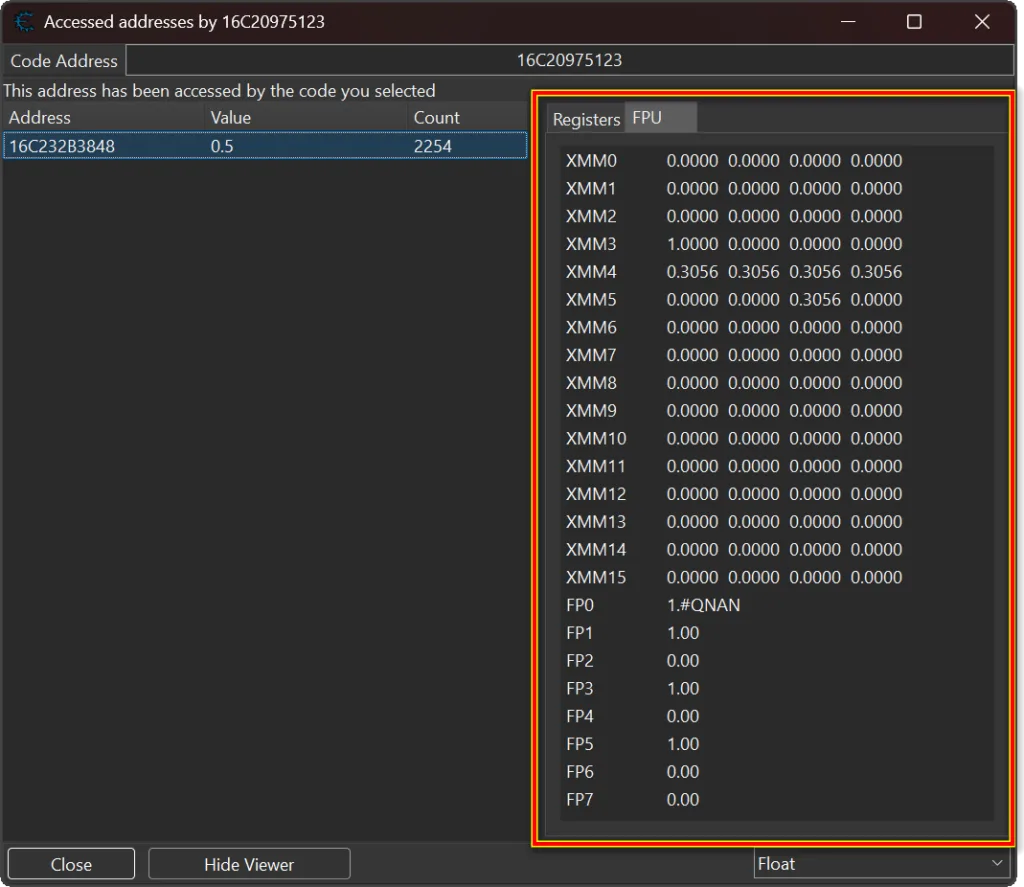
Open the FPU tab to inspect the selected snapshot’s floating-point context. The viewer presents x87 FPU entries and XMM/SIMD values in a compact table, so floating-point and vector state stays visible beside the accessed-address row that produced it.
✨ Key Features ✨
- Adds a collapsible Registers and FPU panel to the Accessed addresses by … window.
- Shows guarded fast snapshots for compatible selected rows.
- Displays general-purpose registers, flags, x87 values, and XMM/SIMD values.
- Offers copy, Memory Viewer, and disassembler actions for register values.
- Copies a resolved base-register value for the selected instruction when available.
- Opens the selected row IPT log when Cheat Engine exposes it.
- Uses native Cheat Engine snapshot views as a fallback where supported.
- Keeps a temporary per-window cache and remembers viewer bounds per Cheat Engine version.
- Requires no API key, network connection, or external service.
⚙️ Installation ⚙️
- Download MiMemory Viewer – Accessed Snapshot Viewer (v1.0).lua.
- Copy it to Cheat Engine’s autorun directory.
- Start or restart Cheat Engine.
- Open an Accessed addresses by … window, select a row, and open the viewer.
Typical location: Cheat Engine\autorun\.
Download Cheat Engine from the official Cheat Engine website.
⚠️ Compatibility Notes ⚠️
- Choose an accessed-address row before requesting a snapshot.
- Direct inline snapshots depend on the context layout and controls exposed by the installed Cheat Engine build.
- Native Registers and FPU views are used only when Cheat Engine exposes the required controls.
- The in-memory snapshot cache is cleared when the accessed-address window closes.
- Test the plugin in your installed Cheat Engine version before relying on it in a live investigation.
💬 Feedback & Support 💬
Have a compatibility report, feature idea, or bug report? Leave a comment below.

Attachments
| File | Date added | Added by | File size | Downloads |
|---|---|---|---|---|
 Accessed Snapshot Viewer (v1.0).zip
|
August 13, 2026 9:34 AM | mul0 | 135 KB | 8 |