
🔎 Address Details – Plugin for Cheat Engine 🔎
Lightweight plugin for Cheat Engine, designed to quickly inspect detailed information about the currently selected or manually entered address inside the Memory Viewer.
This plugin helps you analyze addresses, symbols, modules, memory regions, protection flags, bytes, and disassembly data in one clean window. It is especially useful for reverse engineering, debugging, trainer development, and memory analysis workflows. 🚀
Address Details is a Cheat Engine Lua plugin that provides a fast read-only address inspector directly integrated into the Memory Viewer. It allows you to inspect address-related data without manually checking multiple Cheat Engine windows or tools.

📌 Plugin Information 📌
- Version: 1.0
- Website: https://mul0.com
- Platform: Cheat Engine (Lua plugin)
- Hotkey: Ctrl + I
🔥 Key Features 🔥
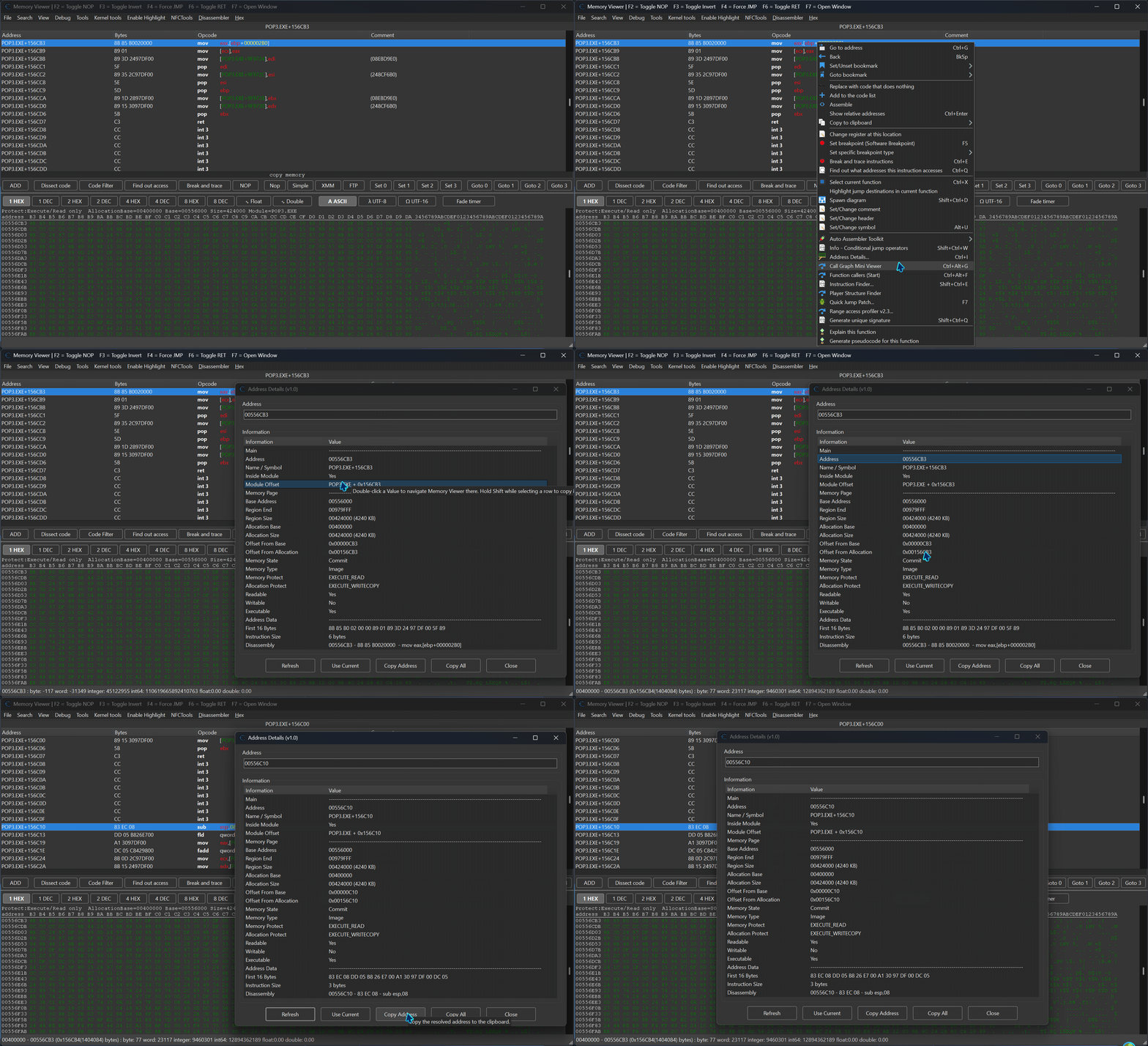
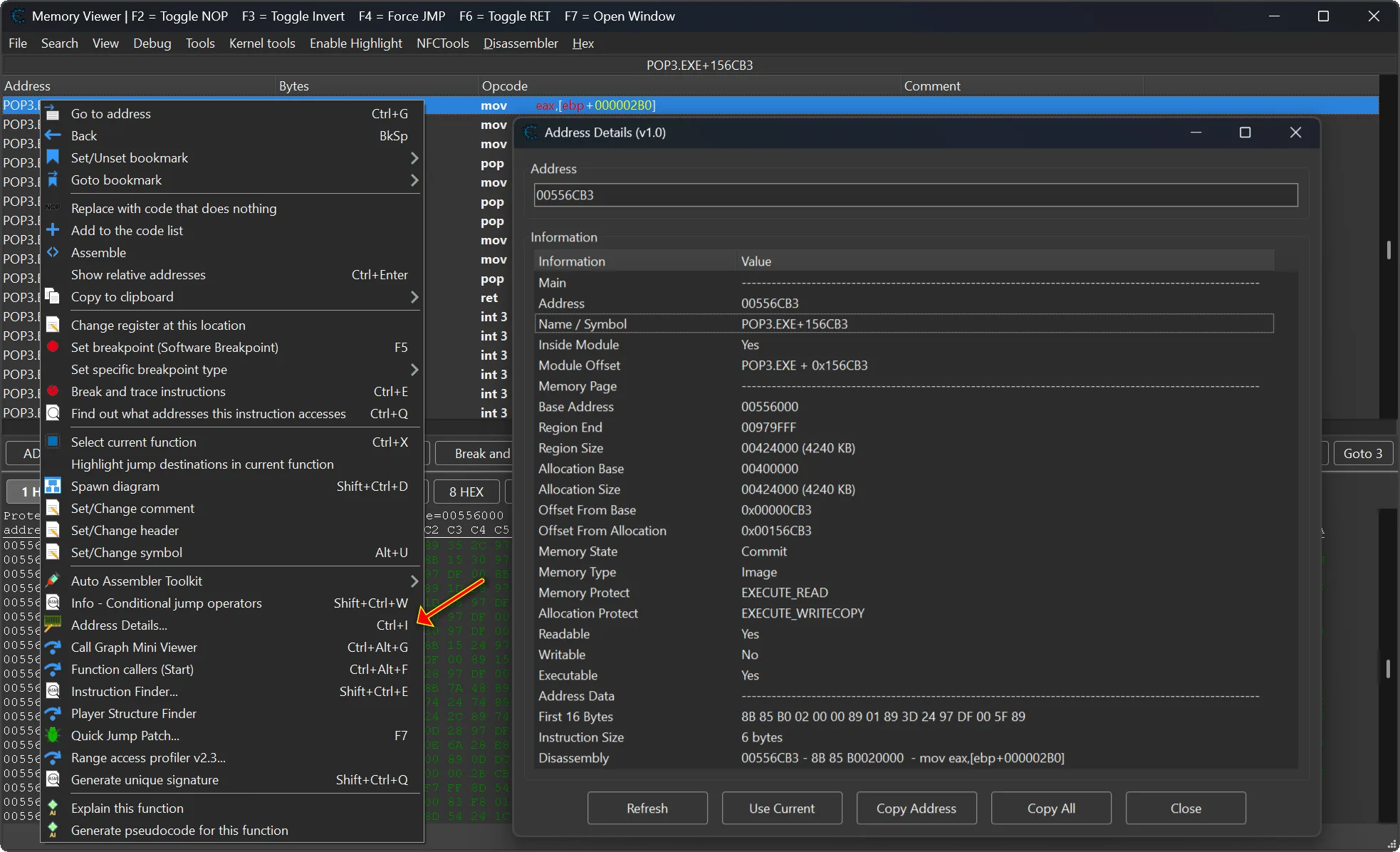
- Opens directly from the Memory Viewer popup menu or with Ctrl + I.
- Inspects the current selected address from the disassembler or hex view.
- Supports manual address or symbol entry.
- Shows resolved address, symbol name, module information, and module offset.
- Displays memory page data, including base address, region size, and protection flags.
- Shows address bytes, instruction line, and instruction size.
- Allows copying selected values or all address information to clipboard.
- Can navigate the Memory Viewer to address-like values from the information table.
- Uses a clean, DPI-aware, resizable interface.
- Works in read-only mode and does not modify process memory.
🔍 Address Inspection 🔍
The plugin allows you to inspect important address-related data in one place. Instead of manually checking symbols, modules, memory regions, bytes, and disassembly information separately, Address Details collects everything into a single structured window.
- Main section shows the resolved address, symbol, module, and address type.
- Memory Page section shows region base, size, protection, and memory flags.
- Address Data section shows bytes, instruction text, and instruction size.
🧠 Memory Region Details 🧠
Address Details can display memory page information for the selected address, including protection flags such as readable, writable, executable, guard page, and copy-on-write status. This makes it easier to understand what kind of memory region you are working with during reverse engineering or debugging.
- Shows memory region base address.
- Shows memory region size.
- Displays readable, writable, and executable status.
- Shows protection flags in a clean readable format.
- Uses Cheat Engine memory region functions with fallback handling.
🖥 Interactive Information Window 🖥
- Clean and simple address input field.
- Refresh button to reload information for the current address.
- Use Current button to inspect the selected Memory Viewer address.
- Copy Address button to copy the resolved address.
- Copy All button to copy the full information table.
- Double-click address-like values to navigate to them in the Memory Viewer.
- Resizable layout with proper DPI scaling.
⌨️ Shortcuts & Integration ⌨️
- Select an address in the Cheat Engine Memory Viewer.
- Press Ctrl + I to open the Address Details window.
- You can also use the Address Details… option from the Memory Viewer popup menu.
- The plugin automatically reads the selected disassembler or hex view address.
- Manual address and symbol input is also supported.
📋 Productivity Tools 📋
- Copy selected information values to clipboard.
- Copy the full address report in one action.
- Quickly reuse the current Memory Viewer selection.
- Navigate to resolved address-like values directly from the information list.
- Reduce manual checking when analyzing instructions, pointers, symbols, or memory pages.
⚙️ How It Works (Technical Overview) ⚙️
- The plugin reads the currently selected address from the Memory Viewer.
- It resolves the address or symbol using Cheat Engine Lua functions.
- It collects symbol, module, memory region, protection, bytes, and disassembly data.
- The information is grouped into readable sections inside the plugin window.
- The user can refresh, copy, or navigate to related address values.
This workflow makes address analysis faster and more comfortable, especially when working with game code, unknown instructions, pointers, and memory regions. 🧩
⚙️ Installation ⚙️
- Place the “MiMemory Viewer – Address Details.lua” file into Cheat Engine’s autorun folder (Cheat Engine\autorun).
- Restart Cheat Engine.
- Attach Cheat Engine to a process.
- Open the Memory Viewer.
- Select an address and press Ctrl + I or use Address Details… from the popup menu.
🛡 Important Notes 🛡
- This plugin is read-only.
- It does not modify process memory.
- Memory region information depends on the currently attached process.
- If an address cannot be resolved, the plugin will show an error message instead of crashing.
- Non-UI status and debug messages are written to the Lua console.
💬 Feedback & Support 💬
Have suggestions or need help? Drop a comment below! 🙌
Attachments
| File | Date added | Added by | File size | Downloads |
|---|---|---|---|---|
 MiMemory Viewer - Address Details (v1.0).zip
|
June 9, 2026 2:42 PM | mul0 | 280 KB | 84 |
This is my first time visiting here 🌟, and I am genuinely delighted to read everything in one place 📚.
Hello there, I found your web site by means of Google
even as searching for a related subject, your site got here up, it appears to be like good. I have bookmarked it in my bookmarks.
Cheers!
Everyone loves what you usually do.
What a great job! Keep up the good work—I’ve already added you to my list of favorite blogs.