
🎨 Clear Table Colors 🎨
Clear Table Colors is a lightweight Cheat Engine Lua autorun plugin that restores the default Address List text color for records in the current Cheat Table.
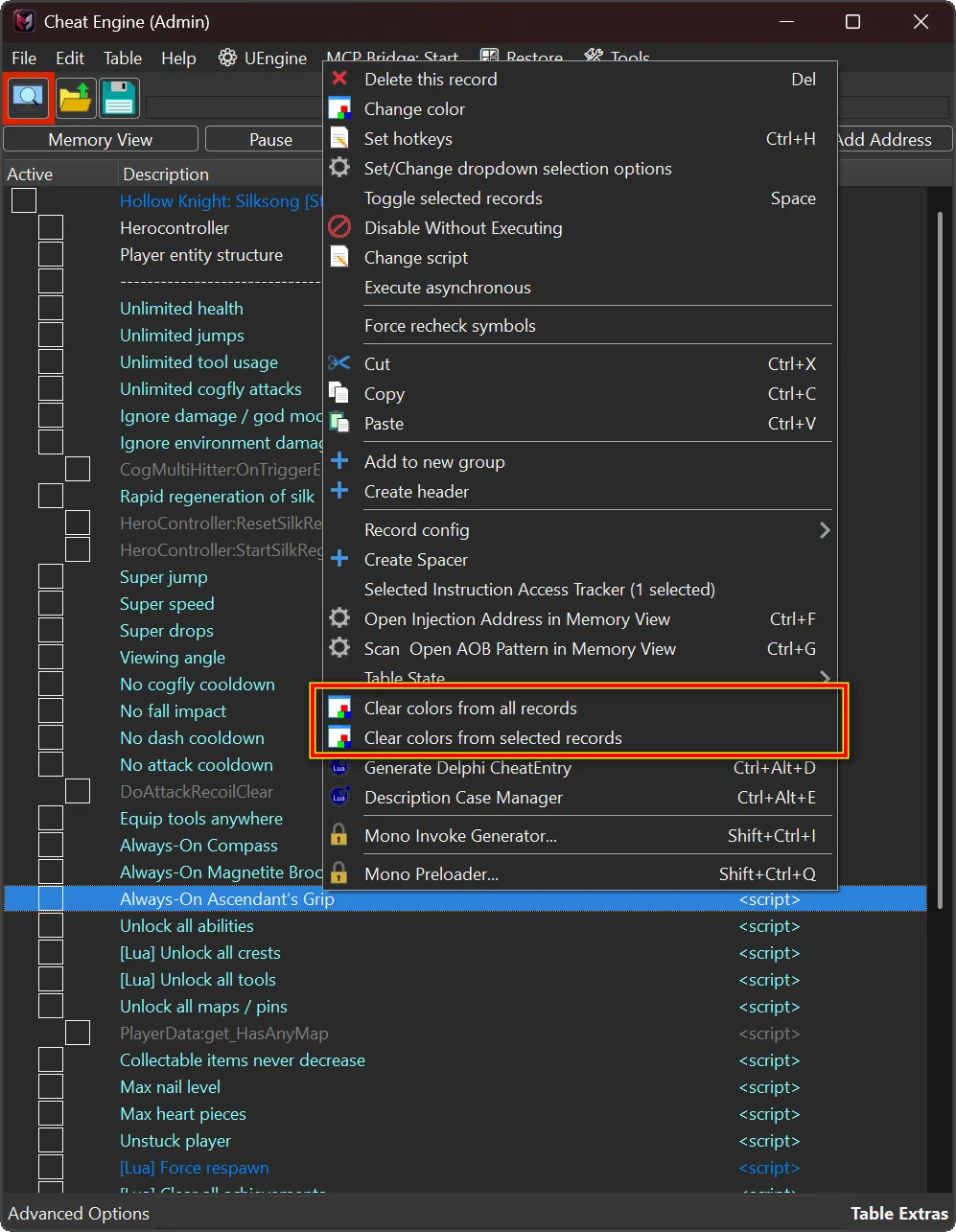
Cheat Tables can accumulate custom text colors as records are edited, imported, or reused. Clear Table Colors adds two confirmation-based cleanup actions to the Address List right-click menu: reset colors for selected records and their descendants, or reset every record in the current table. The plugin changes only the targeted text colors; it does not alter addresses, values, scripts, activation state, descriptions, or other record properties.
📋 Plugin Information 📋
- Name: Clear Table Colors
- Version: 1.0
- Release date: 13/August/2026
- Author: mul0
- Platform: Cheat Engine Lua autorun plugin for Windows
🧹 What the Plugin Does 🧹
The plugin restores the standard Address List text color for targeted Cheat Table records. It is intended for cleaning up visual formatting after testing, reorganizing, importing, or reusing a table. Both actions ask for confirmation, refresh the Address List after cleanup, and show a summary with processed and failed record counts.
✅ Clear Colors from Selected Records ✅
Select one or more records in the Address List, right-click, and choose Clear colors from selected records. When you select a group record, its descendant records are included automatically. This makes it practical to clean a complete section of a Cheat Table without touching unrelated records.
🧽 Clear Colors from All Records 🧽
Right-click inside the Address List and choose Clear colors from all records to reset text colors across the entire current Cheat Table. Use the confirmation dialog to make sure the current table is the one you intend to clean.
✨ Key Features ✨
- Adds two Address List color-cleanup actions.
- Clears colors from one or multiple selected records.
- Includes descendant records of selected group records.
- Clears colors from every record in the current Cheat Table.
- Requests confirmation before changing records.
- Continues when an individual record cannot be updated.
- Refreshes and repaints the Address List after cleanup.
- Reports processed and failed record counts.
- Requires no API key, internet connection, or external service.
⚙️ Installation ⚙️
- Download MiMain – Clear Table Colors (v1.0).lua.
- Copy the file into Cheat Engine\autorun\.
- Start or restart Cheat Engine.
- Open a Cheat Table and right-click inside the Address List.
- Choose Clear colors from selected records or Clear colors from all records.
Cheat Engine is available from the official Cheat Engine website.
⚠️ Important Notes ⚠️
- The plugin changes only the text color of targeted Address List records.
- It does not change addresses, values, scripts, activation state, descriptions, or other record properties.
- Selected group records include their descendants.
- Cleanup is idempotent: running it again keeps records at their default text color.
- Save the Cheat Table to retain the cleaned colors.
- If no records or no selected records are available, the plugin makes no change and shows an informational message.
💬 Feedback & Support 💬
Have a compatibility report, feature idea, or bug report? Leave a comment below.

Attachments
| File | Date added | Added by | File size | Downloads |
|---|---|---|---|---|
 Clear Table Colors (v1.0).zip
|
August 13, 2026 8:33 AM | mul0 | 137 KB | 8 |