17 Options | Game Version: v1.0.0.181 | Last Updated: 17/04/2026
Enhance your gameplay experience in Prince of Persia: The Two Thrones (v1.0.0.181) with this powerful +17 trainer by mul0. First of all, this trainer allows you to take full control over core mechanics. At the same time, it removes gameplay limitations and gives you full freedom to customize your experience.
Furthermore, the trainer introduces advanced features such as unlimited health, sand powers, and movement enhancements. Because of this, you can explore levels without restrictions and experiment with different playstyles. In addition, combat becomes more dynamic and flexible. For example, you can attack faster, avoid damage, and control time mechanics effortlessly.
Moreover, the Dark Prince transformation adds a completely different gameplay dimension. As a result, you can switch between playstyles and test various strategies. Overall, this trainer is optimized for performance, stability, and maximum gameplay control.
For more information on enhancing gameplay with cheats, check out our YouTube channel Mul_O’s Gaming Tips.
If you’re a fan of Prince of Persia®, don’t miss this game.
Prince of Persia: The Two Thrones™ on Steam¹

The Prince of Persia, a seasoned warrior, returns from the Island of Time to Babylon with his love, Kaileena. Instead of the peace that he longs for, he finds his homeland ravaged by war and the kingdom turned against him.

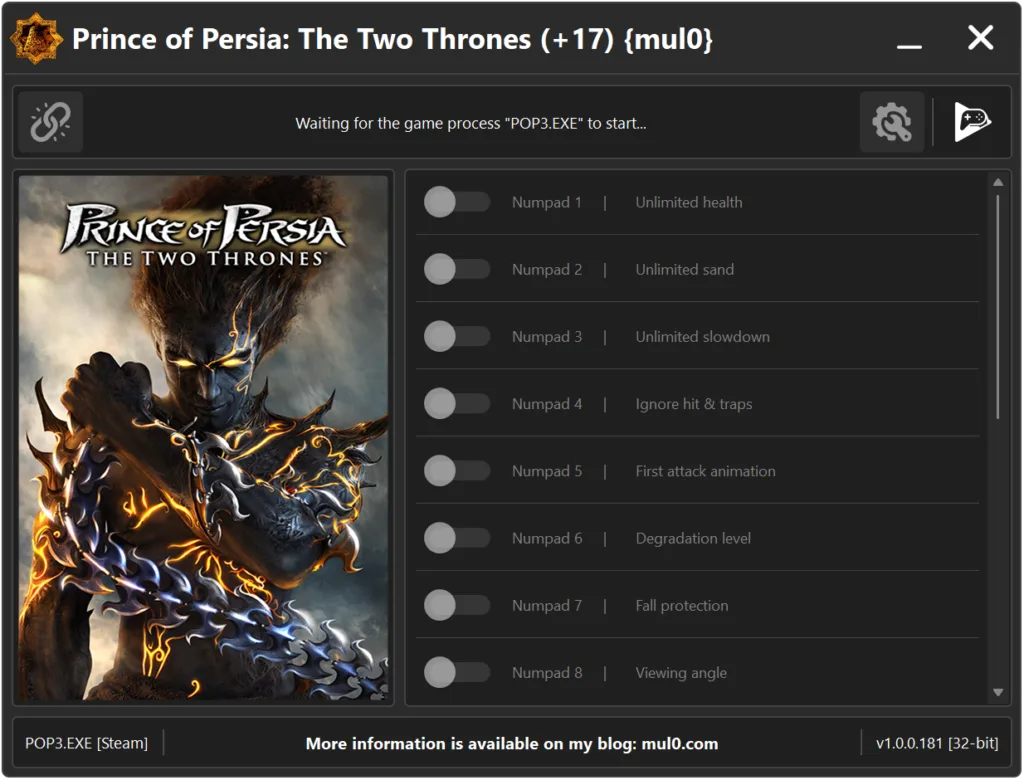
| Game | Version | Process | License Type | Date of Creation |
|---|---|---|---|---|
| Prince of Persia: The Two Thrones | v1.0.0.181 | POP3.EXE (32-bit) | Steam | 17/04/2026 |
| Hotkeys | Features | Description |
|---|---|---|
| Numpad 1 | Unlimited health | Your health will never drop to a fatal level, making it effectively unlimited. |
| Numpad 2 | Unlimited sand | Provides an unlimited amount of sand of time, allowing continuous use of time powers without consuming sand. |
| Numpad 3 | Unlimited slowdown | Allows the player to remain in slowdown mode indefinitely. |
| Numpad 4 | Ignore hit & traps | Allows to ignore damage from enemy attacks and traps. |
| Numpad 5 | First attack animation | Forces the game to play only the first attack animation, allowing faster attack. |
| Numpad 6 | Degradation level | Prevents secondary weapons from degrading or breaking. |
| Numpad 7 | Fall protection | Prevents damage or death from falling from great heights. |
| Numpad 8 | Viewing angle | Adjusts the camera viewing angle, allowing a wider field of view. |
| Numpad 9 | Quick rewind | Speeds up time rewind, allowing you to rewind time much faster than normal. |
| F1 | Quick actions during slowdown | Allows the player to perform actions faster while slow motion is active. |
| F2 | Camera jumps with player | Forces the camera to follow player movement (jumps). Normally the character jumps while the camera remains fixed. |
| F3 | Activate the dark prince | Allows you to transform into the "Dark Prince" at any time after death. Note: It is recommended not to enable this option before obtaining the "Dagger of Time". |
| F4 | Walk through walls | Allows the player to pass through walls and doors. Hold "ALT" while moving to activate the effect. Hold "G" to disable all collision and fall through the ground. |
| F5 | Instant death | Instantly kills your character. Press "K" to immediately trigger death and display the death screen. |
| F6 | Speeding up actions | Holding "SHIFT" while performing actions (such as wall running or jumping) speeds them up. |
| F7 | Speed up animations | Increases the speed of all player actions including running, attacks and other movements. Hold "CTRL" to activate. |
| F8 | Hide HUD | Hides HUD elements, including health and sand indicators. |
Instructions
- Copy all files from the archive to the desktop.
- Start the game and wait until it is fully loaded into gameplay (not just the main menu).
- Only after the game has finished loading, run the trainer.
- If the game process is found successfully, the connect button will become available in the trainer.
How to activate the trainer:
- To activate the trainer, click the button with the broken chain icon. It is located in the upper-left panel of the trainer interface.
- After a successful connection, you can activate and use all available features.
- During the game, press the hotkeys shown in the trainer to enable or disable features.
- Possible false alarm of your antivirus on the trainer.
- If your antivirus blocks the trainer, temporarily disable it.
Video presentation of the trainer
Attachments
| File | Date added | Added by | File size | Downloads |
|---|---|---|---|---|
 Prince of Persia The Two Thrones (+17) {mul0} [v1.0.0.181].zip
|
April 18, 2026 9:34 AM | mul0 | 10 MB | 572 |